
Required information
Fields
- Seller and buyer details.
- Receipt number. Date of payment.
- Related invoice / transaction reference.
- Detailed goods or services.
- Total amount, amount actually received, balance.
- Method of payment. Payment notes.
Proof of payment received
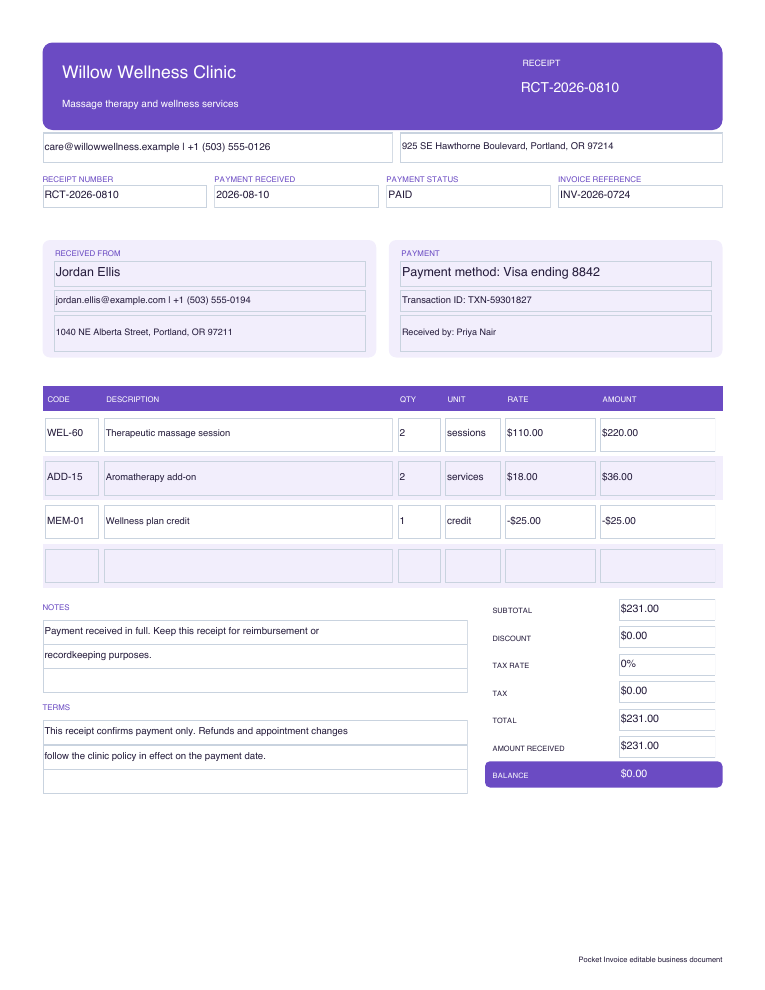
Use our free payment receipt template when you have received full or partial payment. Enter details of the seller and customer, receipt number, date of payment, detailed sales, tax, amount actually received, balance and method of payment.
Download it now
Editable Word. Excel with formula calculation. Fillable PDF for fixed form layout.
Required information
Use online instead
Use the browser tool and the total amount is calculated automatically as you fill in your details. It will recalculate the amount in each line, subtotal, discount, tax. It will calculate the balance from the amount actually received, which you enter.
Make a receipt onlineFour steps
Download our payment receipt template in editable Word, Excel with formula calculation or fillable PDF.
Amend sample details for seller and buyer.
Enter goods or services covered by this payment (tax, total, amount actually received and method of payment).
Ensure the receipt reflects the actual payment. Save and distribute the completed copy.
See our cash receipt guide. How to modify this general file to track the actual cash received. Also see our Word template for a hotel receipt. Enter dates of stay, room nights, additional charges and payment.
Frequently asked questions
Yes. We provide free editable Word, Excel with formula calculation or fillable PDF receipt templates. We also offer a free online receipt generator.
An invoice is what you use to request payment from your customer. A receipt shows you as the seller have received the money.
Yes. Enter the full amount of the transaction. Also enter the amount actually received separately to show the remaining balance.
Excel template. Online receipt generator will also calculate the balance. If you use Word or fillable PDF you have to check the amounts manually.
Related downloads
Before work is approved
Use an estimate before obtaining customer approval to document the work that you propose. Enter estimated quantities. Prices. Tax. Discounts. Advance payment. Valid until. Assumptions on scope.
View downloads Create an estimate onlineA clear price for defined work
Use a quote to document your scope and price. Enter details for itemized services. Quantities. Tax. Discounts. Advance payment. Quote expiry. Terms of acceptance.
View downloads Create a quote onlineAuthorize a supplier purchase
Enter buyer, supplier. Delivery location. Approve purchase quantities and prices. Enter delivery and payment terms. This purchase is identified by its unique purchase order number.
View downloads Generate a purchase order onlinePrice a roof before work begins
Enter size of the roof, pitch. Itemize tear off. Materials. Labor. Flashing. Disposal. Permit fees. Exclusions. Valid until. Advance payment. Change order terms.
View downloads Calculate roofing cost