What the expense tracker records
Each row connects a business purchase with its date, vendor, purpose, category, payment method, receipt or reference, amounts, and any client or project. This makes the ledger easier to reconcile with statements and source documents.
The workbook separates editable input cells from calculated totals. It is designed for one reporting currency per file; duplicate the workbook when separate currencies must remain distinct.
- Date, vendor, and business description
- Category and payment method
- Receipt or transaction reference
- Net, tax, total, and reimbursable status
- Client, project, and notes
How the Excel summaries work
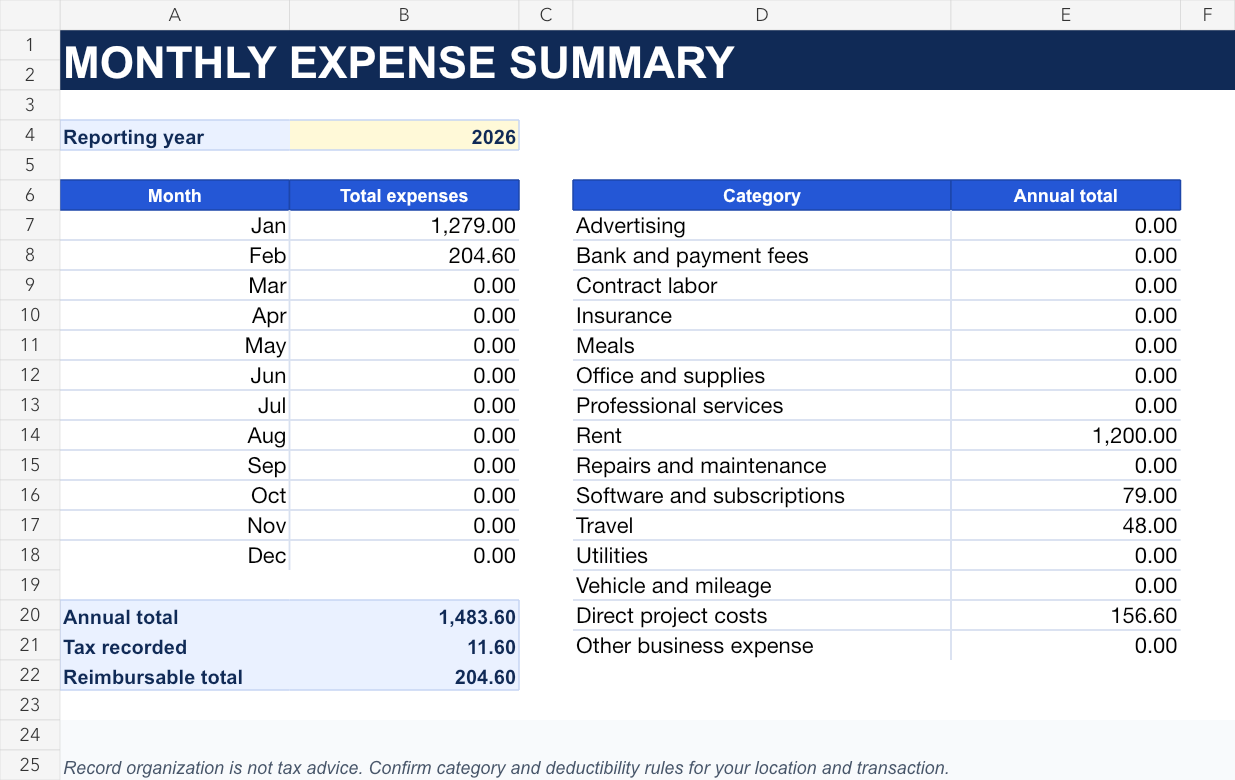
The Monthly Summary sheet uses formulas to total expenses by calendar month and by category. Change the reporting year once, and the monthly formulas use the dates in the expense log to update the selected year.
The categories remain visible on a separate sheet and power the category dropdown in the log. You can edit that list to match the business chart of accounts, then keep the same labels throughout the year.
- Formula-driven monthly totals
- Annual totals by category
- Separate tax and reimbursable summaries
- Editable category list and dropdown
- No macros or hidden calculations
Review the tracker every month
Match the log to bank and card statements, resolve duplicates or missing entries, and attach or reference readable receipts. Review uncategorized transactions and confirm that reimbursable costs are linked to the right client approval and invoice.
An expense category does not by itself determine tax treatment. Rules vary by jurisdiction and transaction, so review the records and categories with the person responsible for the business accounts or tax filings.
- Reconcile account balances
- Resolve missing receipts
- Review uncategorized or duplicated costs
- Match reimbursable items to client billing
- Confirm current accounting and tax treatment