What the invoice tracker records
Each row connects one invoice to its customer, dates, currency, amounts, payment status and latest follow-up note. The balance and days-overdue fields are calculated from the entered values and dates.
Use one reporting currency per workbook so the summary totals remain meaningful. Keep the original invoice and payment evidence with the matching invoice number.
- Invoice number and customer
- Issue date and due date
- Subtotal, tax and total
- Amount paid and balance
- Status, days overdue and follow-up note
How the Excel summaries work
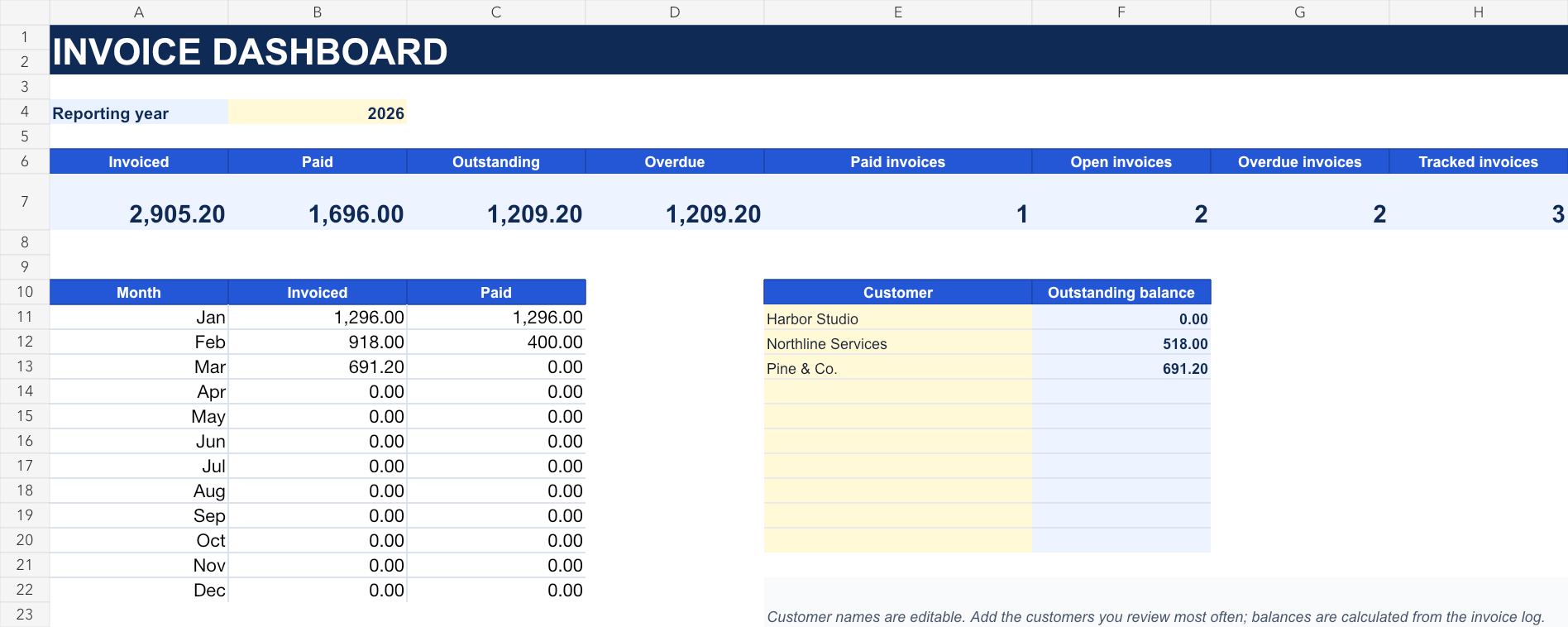
The Dashboard sheet totals invoiced, paid, outstanding and overdue amounts for the selected reporting year. Monthly formulas use issue dates, while customer balances use the customer names in the invoice log.
Status remains an editable business record. The calculated balance and overdue days help review the entry, but they do not replace reconciliation with bank records or the customer account.
- Formula-driven balances
- Outstanding and overdue totals
- Monthly invoiced and paid totals
- Customer balance summary
- No macros or hidden calculations
Review invoices and payments regularly
Match payments to invoice numbers, update partially paid invoices, review due dates and document the latest customer follow-up. Resolve credits, refunds or disputed amounts in the source records before changing the tracker.
The template organizes invoice activity but does not send reminders or decide accounting treatment. Confirm local recordkeeping, tax and collection requirements for the business.
- Reconcile payments
- Review overdue balances
- Document follow-up dates
- Match credits and adjustments
- Keep source invoices and payment evidence