
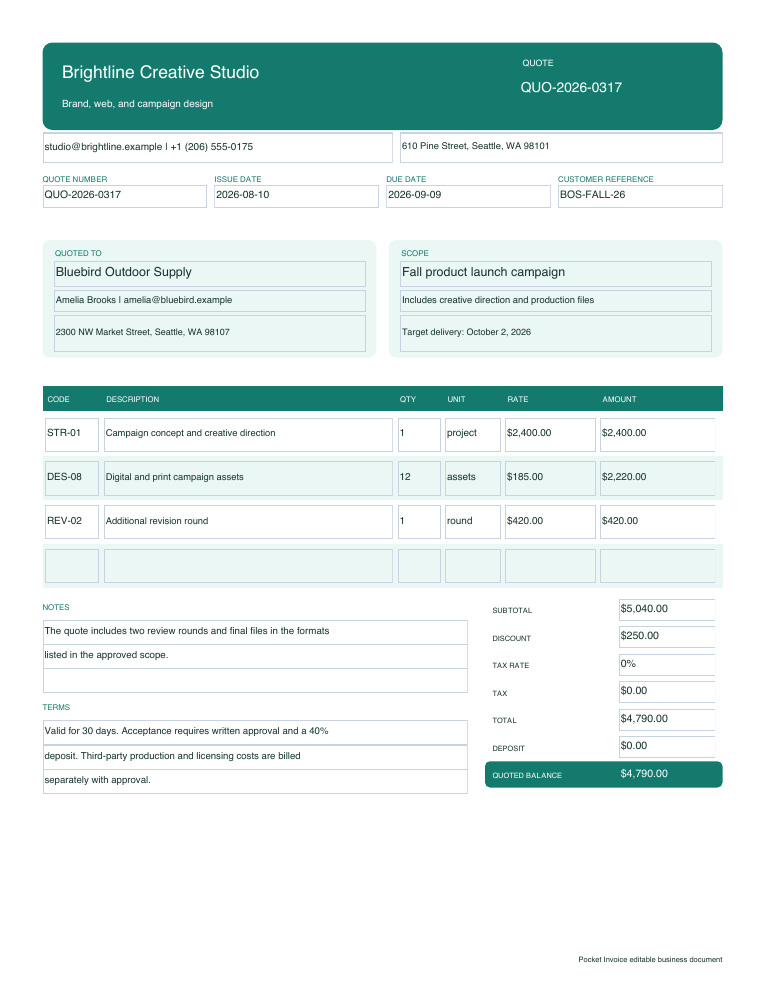
Required information
Included info
- Seller and buyer.
- Quote number and issue date.
- Quote validity period.
- Details of each product/service item.
- Subtotal. Discount. Tax. Advance payment. Balance.
- Acceptance terms. Delivery terms. Change terms.
A clear price for defined work
You can create a detailed price and work scope with the quote template. Just like listing details of each line-item, quantity, tax, discount, advance payment, quote validity and acceptance terms.
Download immediately
You can edit this document in Word, and use Excel formulas for total calculation. Or you can use a fillable PDF to keep the form layout unchanged.
Required information
Use online instead
During editing you can use the browser tool to calculate each line amount, subtotal, discount, tax automatically and use the payment amount input to update the balance.
Create a quote onlineFour steps
Download the Word, Excel or fillable PDF version of the quote template.
Replace seller and customer sample info as well as the work scope sample.
Input the quote details of each item: quantity, unit price, tax, discount and advance payment.
Review the quote validity and acceptance terms. Save a copy as the final version to send to the customer.
Based on Google Docs import instructions, you can modify your proposed work scope and payment terms. Please refer to the Google Sheets guide for quantity*unit price calculation. It illustrates how to use the tax formula, discount formula and advance payment formula in the files and some cautions when you add line-items.
Frequently asked questions
Yes. We provide free downloads in three formats, as well as an online quote generator.
Usually, an estimate is used to list expected cost (might change with scope). And usually, a quote is for a specific scope (relatively fixed price within the valid period).
Yes. There are fields for tax, discount, advance payment, balance in the quote. Please check the tax treatment that applies to your transaction.
Excel version or online quote generator will help to calculate automatically. You need to check the total manually in the Word and fillable PDF versions.
Related downloads
Before work is approved
Before the customer confirms, use this estimate template to list the proposed work and estimated quantity/price/tax/discount/advance payment/validity/scope assumptions.
View downloads Create an estimate onlineProof of payment received
After receiving the full payment or partial payment, use this receipt template to list seller, customer, receipt number, payment date, itemized sale details, tax, amount received, balance and payment method.
View downloads Make a receipt onlineAuthorize a supplier purchase
Fill in buyer, supplier and delivery address. Confirm the purchase quantity/price. Fill in delivery/payment terms. Use a purchase order number (unique ID) to identify the purchase.
View downloads Generate a purchase order onlinePrice a roof before work begins
Use this template to list roof size, pitch. Separately list the items: tear off, materials, labor, flashing, disposal, permit fee. List exclusions. List validity, advance payment and change order terms.
View downloads Calculate roofing cost